AI for your Smarthome
From now on, it will be possible to use the AI of your 2K+/WQHD 4K/UHD camera directly in third-party software to recognise people, cars, animals, etc.! For an overview of all object classes, see also - AI Object Recognition
Object Recognition
Until now, object detection could only be used indirectly. In the Alarm/Actions menu, the AI model could be used as a filter to reject alarms without people/cars/animals as false alarms. The Alarm/Object Detection menu then allowed fine-tuning by setting a minimum and maximum size expected for the object and a threshold value for the confidence required for recognition.
Analysis of error detections
When errors were detected by the AI model, it was previously difficult to identify the cause or determine a minimum threshold value/object size that would rule out detection.
By querying the model directly, you can now obtain the raw data with the object class, the confidence with which the prediction was made, and the position in the image. This can be done with the following CGI command:
param.cgi?cmd=getmodelprediction&count=1&model=movingobjectscount: Specifies the number of detections expected. If there is more than one object in the camera image, this must be adjusted accordingly to obtain all detections. If fewer objects are detected than specified by this value, the others are filled with ‘zero values’. This facilitates integration into third-party systems.model: In future, different AI models will be available on the camera. Currently, only movingobjects is available, which is also used for alarm object detection.
The return value of this command then looks like this, for example:
cmd="getmodelprediction";
objects="[{"class": "person", "confidence": 0.78, "x": 1344, "y": 240, "w": 640, "h": 704}]";
response="200";
Here, the camera has detected a person in the image area with a 78% probability, whose upper corner is located at pixel x=344, y=240 (these numbers refer to the resolution of the camera image – x=0, y=0 would be the top left corner of the camera image, for example) and a width/height of 640/704 pixels.
If you have placed a Santa Claus in this position, you already have an idea of what could trigger the error detection.
Often it is plants, decorative lighting or similar that triggers error detection. Covering these with a privacy mask solves the problem! In most cases, it is sufficient to simply draw a thin bar through the centre of the object. Simply adjust, request a new prediction from the model and repeat until the detection confidence has fallen below the detection threshold. Smart home
Integration into the smart home using the command above is analogous to the Advanced HTTP Alarm Server (example: Node-RED). This is more convenient via the MQTT interface with the MQTT topic and payload:
alarm/triggered/objects/manual:{"val":"movingobjects"}
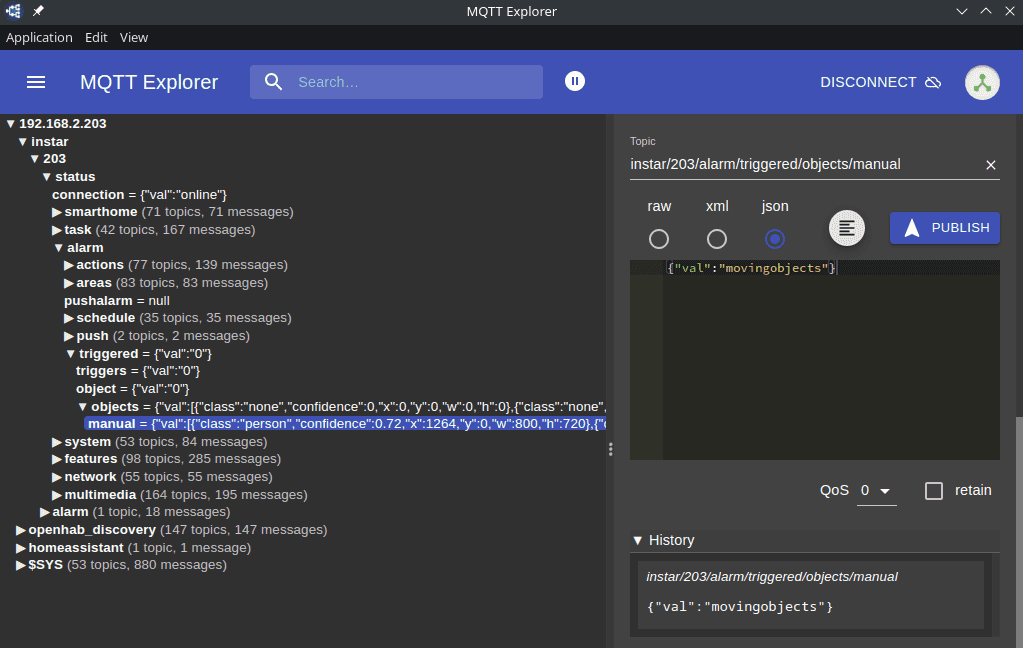
The integration is then carried out in the same way as already explained for the Extended MQTT Alarm Server.
This function allows you to trigger an AI request to the camera for freely definable events from the smart home and to trigger an action after finding the desired object.
See also Home Assistant MQTT Auto-Discovery or OpenHAB MQTT Auto-Discovery for fully automatic integration into your smart home!