IN-9820 4K QFHD Manual
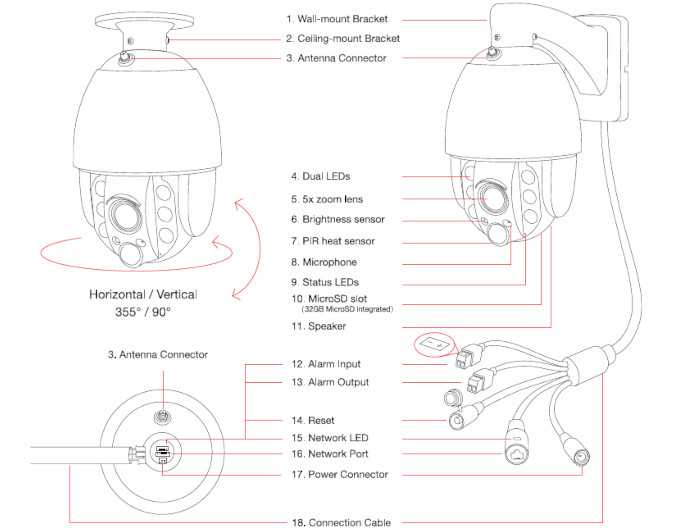
# | Component | Function |
|---|---|---|
| 01 | Wall Bracket | Wall mounting |
| 02 | Ceiling Bracket | Overhead installation |
| 03 | Antenna Connector | For 2x 5db RP-SMA WiFi antenna |
| 04 | Dual LEDs | 6 high-power IR LEDs (@ 850nm), 6 high-power floodlight LEDs |
| 05 | Autofocus Lense | 5x optical zoom lens with autofocus (2,7mm - 13.5mm / ca. 30 - 130°) |
| 06 | Photo Sensor | Twilight switch for IR LEDs |
| 07 | PIR Sensor | Integrated Panasonic passive infrared (PIR) motion detector |
| 08 | Microphone | For noise detection and audio recording |
| 09 | Status LEDs | Red: Camera on or blinking during firmware update, Blue: On during WiFi, blinking during WPS or reset |
| 10 | MicroSD card slot | Slot for MicroSD/SDXC cards (max. 1TB) - 32GB included inside the camera |
| 11 | Loudspeaker | Integrated loudspeaker |
| 12 | Alarm input | Input for potential free external alarm sensors |
| 13 | Alarm output | Output (relay) can support max. 24V/1A |
| 14 | Reset | 3 seconds for WPS WiFi setup / 15s sec. for reset / 20s sec. for reset (incl. network settings) / 30s sec. for reset to last installed firmware version. |
| 15 | Network LED | Indicator for network status, On: connected to network by network cable, Off: No power, Wifi connection or no network cable connected |
| 16 | Network Port | RJ45 LAN port / connector for Cat5e LAN cable or higher |
| 17 | Power Connector | For included 3m, 100 - 240V, 12V / 2A dc power supply |
| 18 | Connection Cable | With LAN- and power connector as well as alarm input, as alarm output, reset |
Status LEDs
Mode | Blue LED | Red LED |
|---|---|---|
| Constant on | Connected to WiFi | N/A |
| Slow Flashing | Connecting via WPS | Camera operational |
| Fast Flashing | No connection to WiFi | Upgrading firmware |
| Off | LED is disabled or Camera has no Power | LED is disabled or Camera has no Power |